

How to Retouch Photos for Instagram Without Looking Fake
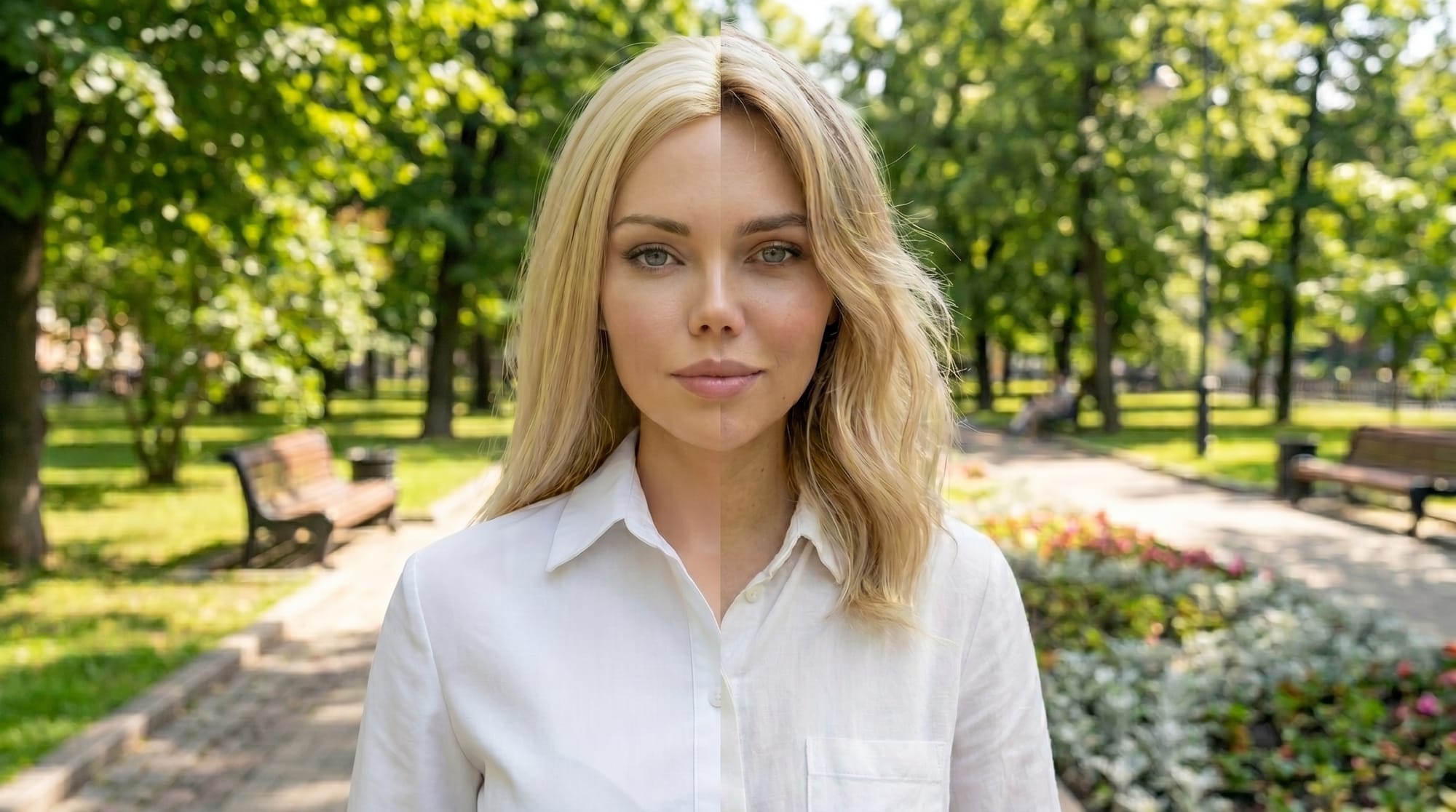
Natural social media photo editing focuses on adjusting lighting and reducing minor distractions rather than completely changing your features.
Natural social media photo editing focuses on adjusting lighting and reducing minor distractions rather than completely changing your features. Instagram's best accounts share one quality: their photos look polished but not processed. Achieving that balance is about knowing exactly when to stop editing.
The Difference Between Instagram Photo Editing and Over-Editing
Photo editing and photo retouching serve different purposes. Editing covers adjustments to lighting, color, and composition. Retouching covers changes to the skin, features, and body shape. The most convincing Instagram photos combine subtle lighting edits with very light skin retouching.
The line is crossed when the skin is smoothed too much, and features are warped. Pulling back before that point is the core skill in natural photo retouching.
Color and Lighting Adjustments for Instagram Photos
Adjustments to light and color can do a significant amount of work before you ever touch the skin. Lifting shadows, reducing blown-out highlights, and warming the white balance produce a flattering image without altering your face. These adjustments give your profile photo and grid posts a highly professional look.
Saturation is worth handling carefully. Boosting it too far makes skin look unnaturally orange or pink. A small lift in vibrance is usually more useful than adjusting the saturation slider directly.
AI Tools for Instagram Photo Enhancement and Skin Retouching
The goal with skin retouching for Instagram is to remove distractions without removing texture. Temporary blemishes and redness are worth addressing because they are not defining features of the face. You should preserve fine lines and pores because removing them shifts the image into the uncanny valley.
Facelab's skin retouching tools let you control the intensity of each adjustment. Applying a light smoothing pass, then reducing its effect, is a reliable workflow for natural results.
Realistic Social Media Photo Editing for Facial Features
Minor adjustments to brightness and contrast in specific areas can dramatically improve a photo. Slightly brightening the whites of the eyes or lightening dark circles reduces visual fatigue without changing the person.
Reshaping the nose or jawline is when editing starts to look fake. If you want to subtly adjust your body shape or facial structure, keeping the changes minimal gives you the most plausible result.
Building a Consistent Look Across Instagram Posts
A single well-retouched photo is less valuable on Instagram than a feed that looks entirely consistent. Applying the same color treatment across every post distinguishes a professional account from an amateur one.
Facelab lets you apply multiple adjustments in a single session. You can process a set of photos to a consistent standard, including your background edits, without switching between apps.
Try It for Yourself
Facelab's retouching tools help you improve photos naturally. Try the app for free with a trial to see how far AI adjustments can take a photo.
Frequently Asked Questions
How do I retouch photos for Instagram without it looking obvious?
Focus on light and color first, then address specific imperfections rather than blurring the whole face. Keep the intensity of skin smoothing low enough that your natural skin texture remains fully visible.
What AI tools work best for Instagram photo enhancement?
The most useful tools combine skin retouching with color and lighting adjustments in one place. Apps that offer adjustable intensity sliders give you much more control over the final result than basic one-tap filters. You will find all of this in Facelab.
Is it bad to retouch your Instagram photos?
Most people who post regularly do some level of editing, and there is no single standard for how much is appropriate. The most common advice is to focus on lighting and temporary imperfections rather than structural changes, since heavy editing tends to be more noticeable and can make photos harder to match with how you look in person.
More in Social Media
View all
What Makes a Pinterest-Perfect Photo (And How to Edit One)
Pinterest has a distinct visual language — bright, clean, high-contrast. Here's how to edit your photos to perform well on the platform.
How to Edit Flat-Lay Photos for Instagram
Flat lays have their own editing rules — light direction, color balance, and background consistency matter more than in portrait shots.
LinkedIn Profile Photo Tips That Actually Get Results
Professional doesn't have to mean boring. These tips help you get a photo that looks authoritative and approachable at the same time.

